EmbroViewer Free online embroidery file viewer
Guide

Free online embroidery file viewer

Open PES, DST, JEF and more in your browser. Check the sewing order, thread colours and hoop fit without uploading your designs.

Free · private · no account

Open an embroidery file

Drag files anywhere in this window, or pick them from your computer. Everything is read in your browser — nothing is uploaded.

DST · PES · PEC · JEF · EXP · VP3 · HUS · XXX · U01
colour files: COL · EDR · INF · or drop an SVG to digitize

How it works, supported formats & FAQ ↓

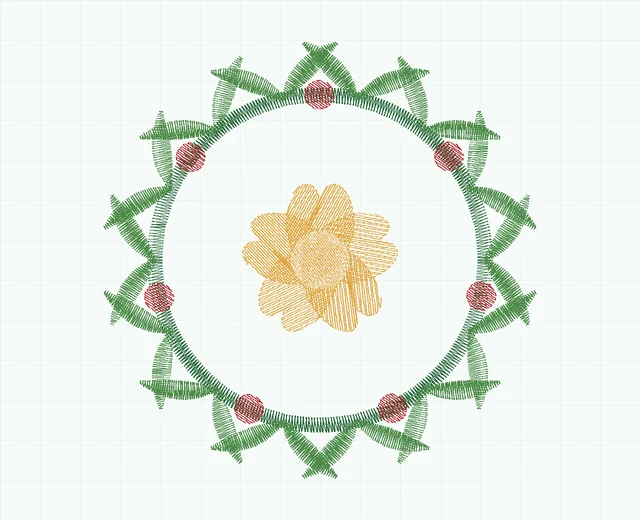
Fern wreath embroidery stitch preview showing 5 colour blocks
Fern wreath · stitch simulation10,478 stitches · 5 colour blocks · 78.6 × 79.2 mm
0 / 0 100%

SVG to stitches

Digitizing works from the vector outlines in your SVG, so edges come out exactly as drawn. A stroked path becomes a satin column of that path's own width; a filled shape gets underlay, angled fill rows and a sealed edge; narrow filled shapes — outlined lettering — are found and satined across the stroke. Export from Illustrator, Figma, Inkscape or Affinity with text converted to outlines.

Artwork nothing loaded

Drop an .svg file here.

vector only — PNG and JPEG are not digitized

Stitch settings

—
0.42 mm
3.2 mm
Advanced
9.0 mm
0.9 mm
1.0 mm²
0.12 mm

Load an SVG to start.

Free · private · no install

View embroidery files online, free

EmbroViewer is a free embroidery file viewer and SVG-to-stitch converter that runs entirely in your web browser. Open DST, PES, PEC, JEF, EXP, VP3, HUS, XXX and U01 files to see the design stitch by stitch, check its size and hoop fit, count colour changes and trims, and export a preview — without installing software and without uploading your files anywhere.

What you can do with EmbroViewer

Supported embroidery file formats

EmbroViewer reads the formats used by the major home and commercial embroidery machines:

FormatBrandMachines
.DSTTajimaTajima and most commercial multi-needle machines (Ricoma, SWF, Happy, Barudan, Melco and others)
.PESBrotherBrother and Baby Lock home and multi-needle machines
.PECBrotherOlder Brother machines and cards; also stored inside every PES file
.JEFJanomeJanome, Elna and other Janome-built machines
.EXPMelco / BerninaMelco commercial machines and many Bernina home machines
.VP3Husqvarna Viking / PfaffHusqvarna Viking and Pfaff machines
.HUSHusqvarna VikingOlder Husqvarna Viking machines
.XXXSingerSinger computerised embroidery machines
.U01BarudanBarudan commercial machines

It also reads COL, EDR and INF colour files, and writes DST and PES from SVG artwork. Not sure which format your machine needs? See embroidery file formats by machine brand.

How to open an embroidery file online

  1. Scroll up and click Open files, or drag one or more embroidery files anywhere onto the page.
  2. The design appears immediately. Use the mouse wheel or +/− to zoom, drag to pan, and press Space to play the sew-out.
  3. Pick a hoop from the menu to check the fit, and open Stats for stitch count, size, colours and run time.
  4. Save a PNG preview or the thread list if you need to share the design.

Private by design — your files are never uploaded

The file readers run as JavaScript inside your browser tab. EmbroViewer does not upload your purchased or customer designs. There is no account or sign-up. Large designs can be limited by your device's available memory and processing power. Once the tool has loaded, reading your own files and playing the stitches work locally; opening another page or loading a sample needs a connection.

Convert SVG artwork to DST or PES

Switch to the Convert tab to turn an SVG logo into embroidery. EmbroViewer reads the vector outlines, then builds fills with underlay, satin columns for strokes and lettering, pull compensation and tie-offs, and lets you preview the result before saving it as DST or PES. Read more on the SVG to DST and SVG to PES pages, or the guide to preparing SVG files for embroidery.

Format viewers

Frequently asked questions

Is EmbroViewer free?

Yes. EmbroViewer is free to use with no account, no watermark and no limit on the number of files.

Are my embroidery files uploaded to a server?

No. Files are read by code running in your own browser. Nothing is sent to EmbroViewer or anyone else.

What embroidery file formats can I open?

DST, PES, PEC, JEF, EXP, VP3, HUS, XXX and U01 designs, plus COL, EDR and INF colour files. SVG files can be converted into DST or PES.

Do I need to install software to view embroidery files?

No. EmbroViewer runs in Chrome, Edge, Firefox and Safari on Windows, macOS, Linux, ChromeOS, iPadOS and Android.

Why does my DST file open in the wrong colours?

DST files do not store thread colours — only where the machine stops to change colour. Add the matching COL, EDR or INF file, or set the colours yourself.

Can I check if a design fits my hoop?

Yes. Choose your hoop size from the menu above the design and EmbroViewer shows whether it fits and by how much.

Can I convert PES to DST or JEF to PES?

Not yet. EmbroViewer currently views all supported formats and writes DST and PES from SVG artwork. Format-to-format conversion is planned.

Can I convert a JPG or PNG to an embroidery file?

EmbroViewer digitizes vector SVG artwork. Trace a JPG or PNG to SVG first (for example with Inkscape's Trace Bitmap), then use the SVG converter.
Guides

Last updated 2026-09-30

Release to load